Cloud & AI
An AI Agent Can Trigger a Workflow. Define the Boundary First.
AWS now lets Step Functions workflows serve as AI-agent tools. The practical question for IT buyers is which workflows may be called, with what inputs, approvals and audit trail.
If an AI agent can start a business workflow, what stops it from starting the wrong one?
Many teams already use workflow automation for routine tasks: creating a support case, collecting inventory data, sending a notification or updating a cloud resource. The next step is making those workflows callable by an AI agent. That can reduce manual handoffs—but only if the organization defines what the agent may do before it is connected.
AWS announced that Step Functions workflows can now be used as tools for AI agents through Amazon Bedrock AgentCore Gateway. AWS’s October 29 announcement is the primary source. AWS’s implementation tutorial describes gateway roles, connector targets and the need to configure a workflow and service role.
This is an AWS capability, not evidence that every workflow should be exposed to an agent or that an agent’s output is safe without review. The buyer lesson is broader: turning a workflow into a tool is an authorization decision, not merely an integration task.
What changed
AWS says an existing Step Functions workflow can be made available to an agent through AgentCore Gateway, rather than requiring a custom Lambda function or a separately defined tool. That can be helpful where a team already has a tested workflow with known steps and error handling.
The workflow is still powerful because it can reach business systems and cloud services. A seemingly harmless request—“clean up unused resources” or “help a new employee get access”—can have financial, security or operational consequences. The value of a workflow is precisely why its tool boundary matters.
Before assuming availability, confirm the applicable AWS region, account configuration, workflow type, service roles, logging setup and pricing. The documentation describes setup steps and service-role prerequisites; it does not make a universal recommendation for any business process.
Start with a narrow first tool
Choose one reversible, low-risk workflow for an initial pilot. Good candidates often collect information, generate a draft report, open a ticket or prepare a proposed change for a person to approve. Avoid giving a new agent direct authority to delete data, change permissions, publish content, purchase services or alter production infrastructure.
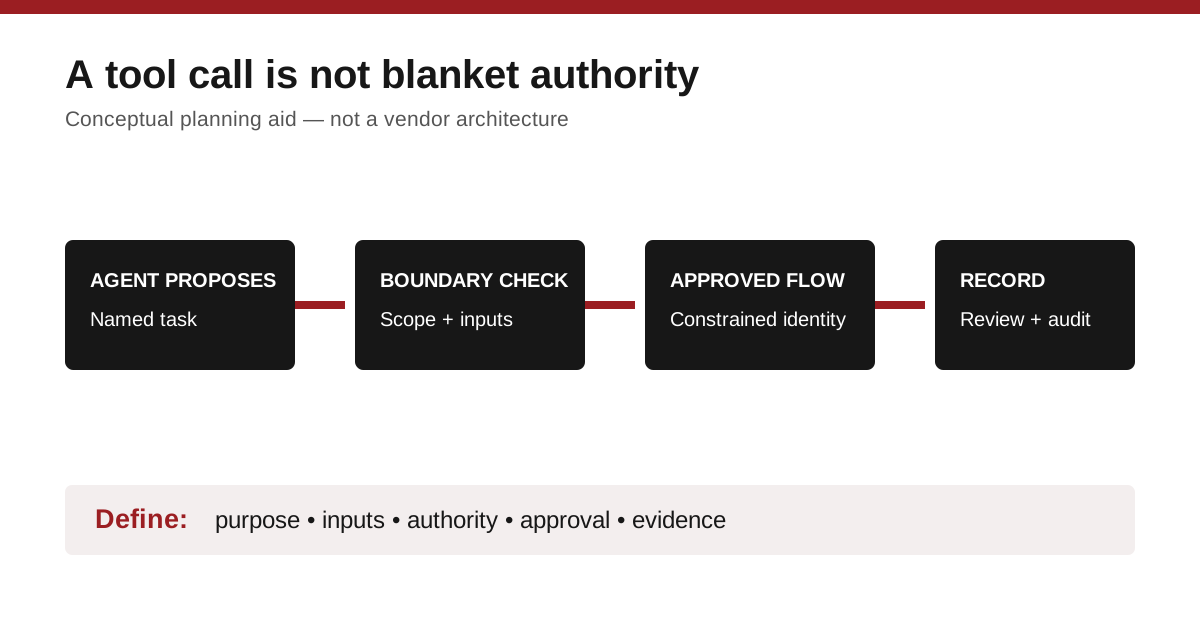
Define the tool in plain language: its purpose, permitted inputs, maximum scope, expected output and stop condition. If a request falls outside that definition, the agent should return a message for human review rather than improvise a broader action.
The original diagram below is a planning aid, not an AWS architecture or a claim about any product’s controls.
Put approval where risk changes
Not every action needs the same process. A useful model has three levels:
- Read: The agent can retrieve approved, non-sensitive operational information within a defined scope.
- Propose: The agent can assemble a ticket, change plan or draft response, but a person approves it.
- Act: The agent invokes a workflow only after a clear policy, a constrained identity and an audit record are in place.
The distinction should be visible to the people who operate the service. If an employee cannot tell whether the agent is summarizing information, requesting an approval or taking action, the design is too opaque.
Ask the implementation team to demonstrate a non-production scenario. Show the prompt, the exact workflow selected, the inputs passed, the identity used, the audit trail and the behavior when a required field is missing. Then test a refusal: ask for an action outside the tool’s approved scope and verify that it does not run.
Keep the ordinary controls
Agent tooling does not replace least privilege, change control, monitoring or recovery planning. Use a dedicated workload identity rather than personal administrator credentials. Limit what that identity can reach. Keep logs where the responsible team can review them. Preserve a way to disable the integration quickly if an issue appears.
Also plan for imperfect requests. An agent may misunderstand an instruction, receive incomplete information or select an inappropriate workflow. Constrained inputs, explicit approvals and safe failure behavior are practical safeguards—not signs that the tool has failed.
The business implication
For a small business, the best first agent workflow may be boring: summarize a support queue, prepare a daily inventory exception report or draft an onboarding checklist. Success is not measured by how many systems an agent can touch. It is measured by whether it saves time while the team can still explain, approve and reverse what happened.
Before exposing a workflow to an agent, ask: can we name its allowed inputs, the identity that runs it, the person who approves higher-risk actions and the evidence we will keep afterward? If not, the workflow is not ready to become a tool.
Sources and editorial note
- AWS announcement — posted October 29, 2026; accessed November 4, 2026.
- AWS Step Functions tutorial — accessed November 4, 2026.
The primary announcement is six days old and the article therefore uses the permitted seven-day freshness window. AWS claims are attributed; no DC Supplies testing, customer result, availability claim or inventory is implied.