Networking & AI
AI Can Help Run a Network Test. Keep the Test Plan.
VIAVI’s new MCP framework is a timely reminder that natural-language testing still needs a defined scope, human review and evidence you can compare later.
If an AI assistant can start a network test, who decides what “good” looks like?
Network testing can be time-consuming: choose the traffic pattern, set the limits, run the test, inspect the results and decide whether a change is safe. A new announcement from VIAVI puts AI assistants closer to that work. The useful response is not to hand over judgment. It is to make the testing process clearer before an assistant accelerates it.
On October 29, VIAVI announced an integration of a Model Context Protocol (MCP) Server Framework into its NITRO AI portfolio. VIAVI says the framework lets engineers configure, run and analyze tests through natural-language prompts across TestCenter, CyberFlood and TeraVM. VIAVI’s October 29 release is the primary source for the announced integration. SDxCentral’s October 30 coverage describes the announcement and reports that human review checkpoints remain part of the approach.
This is an announced vendor capability for VIAVI’s named testing products. It is not evidence that every network test can be safely automated, that a small business needs those products, or that a prompt produces a valid result without an engineer’s review.
What MCP changes—and what it does not
MCP is a way for an AI application to connect to tools and data sources through a defined interface. In this announcement, it is being used to bridge an assistant and network- or security-testing software. In practical terms, a person might describe a test goal in ordinary language instead of manually navigating every setting.
That can lower the friction of repeatable work. It can also make a poorly defined request faster to execute. “Test the new Wi-Fi” leaves important questions unanswered: Which location? Which user devices? What traffic? What normal baseline? What result would stop a rollout?
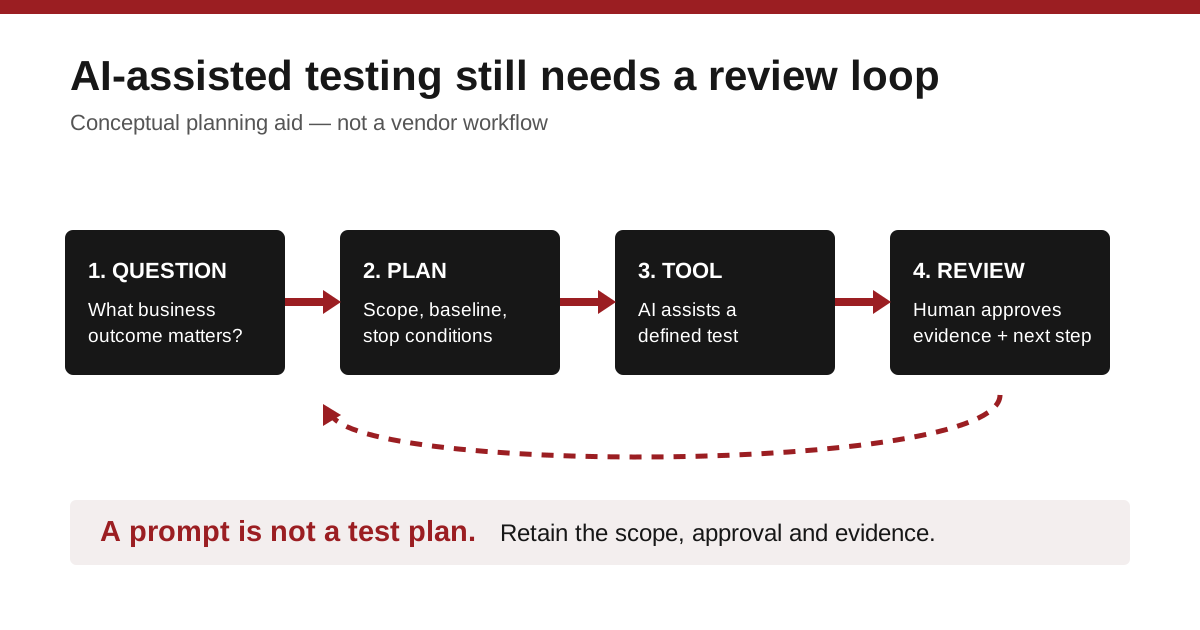
A prompt is not a test plan. The plan supplies the boundaries that let a team interpret the output. Without it, an apparently successful test may only show that a tool completed a task—not that the business service will work when employees, customers or backup traffic depend on it.
Start with the business question
Before selecting any testing platform or AI feature, write a short test charter. It can be one page. State the proposed change, the service users depend on, the time window, the expected traffic and the person who can approve the outcome.
For example, a company considering a new internet connection might define the question as: “Can our voice, cloud accounting and remote-access traffic remain usable during a planned failover?” That is more useful than asking whether the new connection is “fast.” The test should cover representative conditions, a defined observation period and an agreed recovery step if the result is poor.
Then decide what evidence to retain. Keep the configuration version, test date, location, participating systems, result summary and any exceptions. An AI-assisted tool may help collect or summarize that information, but the organization should still be able to explain later what was tested and why.
Give the assistant narrow, reviewable work
A sensible first use is preparation and comparison—not unsupervised change. An assistant can help translate an approved test charter into a proposed configuration, identify missing details, produce a results template or compare a new run with an agreed baseline. A qualified person should review the proposed action before it runs and the results before anyone declares success.
Ask the vendor or IT provider to demonstrate this sequence in a non-production environment. Request that they show the exact tool permissions, the audit trail, how a test is stopped, and how a reviewer can see what the assistant asked the tool to do. Confirm data handling, retention and access control for prompts and test results. Those are evaluation questions, not claims that every MCP connection offers the same safeguards.
Tradeoffs worth pricing
Automation can improve consistency, but it can also introduce a new integration to maintain. Compare the cost and effort of the testing platform, the AI interface, training, access management and support—not just the time saved in a demonstration. Clarify whether the tool is generally available, preview-only or dependent on specific licenses and versions; VIAVI’s announcement does not establish your organization’s entitlement or suitability.
For many small businesses, a disciplined manual test conducted by a capable provider may be more valuable than a sophisticated automation stack. The right choice depends on how often the team tests changes, how costly an outage would be and whether someone can review the evidence.
The question to bring to the next change window
Ask: can we show what we intended to test, what actually ran, who approved it and what we learned? If the answer is yes, AI may reduce the clerical work around a sound process. If not, improve the process before adding another interface.
The diagram below is an original DC Supplies planning aid, not a VIAVI product diagram or a certified testing workflow.
Sources and editorial note
- VIAVI news release — published October 29, 2026; accessed October 31, 2026. Primary source for the announced product integration.
- SDxCentral coverage — published October 30, 2026; accessed October 31, 2026. Independent coverage used to corroborate the announcement.
No DC Supplies testing, benchmark, customer experience, product availability or inventory is claimed. The product’s compatibility, licensing and availability should be confirmed for a specific proposal.