Cloud & Infrastructure
Moving VMware to the Cloud? More Control Also Means More Responsibility.
Google Cloud’s new self-managed VMware option highlights a practical migration question: which parts of the virtualization stack should your team operate after the move?
Is “lift and shift” really simpler if your team still owns the virtualization stack?
For organizations with VMware workloads, moving to cloud infrastructure can promise a faster data-center exit, a new disaster-recovery option or more flexible capacity. But the word “cloud” can hide a major operating decision: who is responsible for the virtualization layer after the move?
Google Cloud made a new self-managed VMware solution generally available on October 27. Google says it provides VMware Cloud Foundation (VCF) on dedicated bare-metal Compute Engine instances, with customers retaining full administrative authority and using a bring-your-own-license model. Google Cloud’s October 27 announcement is the primary source for the offering’s scope. Google’s release notes record its general availability, while SDxCentral’s October 29 coverage describes how it differs from Google’s managed VMware service.
This is a Google Cloud product announcement, not a recommendation that every VMware customer should move or a claim that a migration will lower cost. The useful buyer question is whether the control being offered matches the operational responsibility your team is prepared to retain.
What changed
Google describes the new option as self-managed VCF on dedicated Google Cloud bare metal. It says customers can maintain their own VMware administration, maintenance windows and integrations with third-party management tools. Google also says the option supports portable VCF subscriptions and is generally available in 22 regions.
That is different from a fully managed VMware service, where the provider takes on more of the platform lifecycle. Neither model is inherently better. A managed arrangement can reduce operational work; a self-managed arrangement can preserve familiar tools, processes and timing. The right choice depends on the applications, the people responsible for them and the support commitments behind the design.
“Generally available” does not mean it fits every environment. The hardware shapes, regions, VCF version, licensing terms, network design, migration path and support model must be confirmed for a specific proposal. Do not assume that an existing VMware license, backup product or monitoring integration transfers unchanged.
Map responsibilities before comparing prices
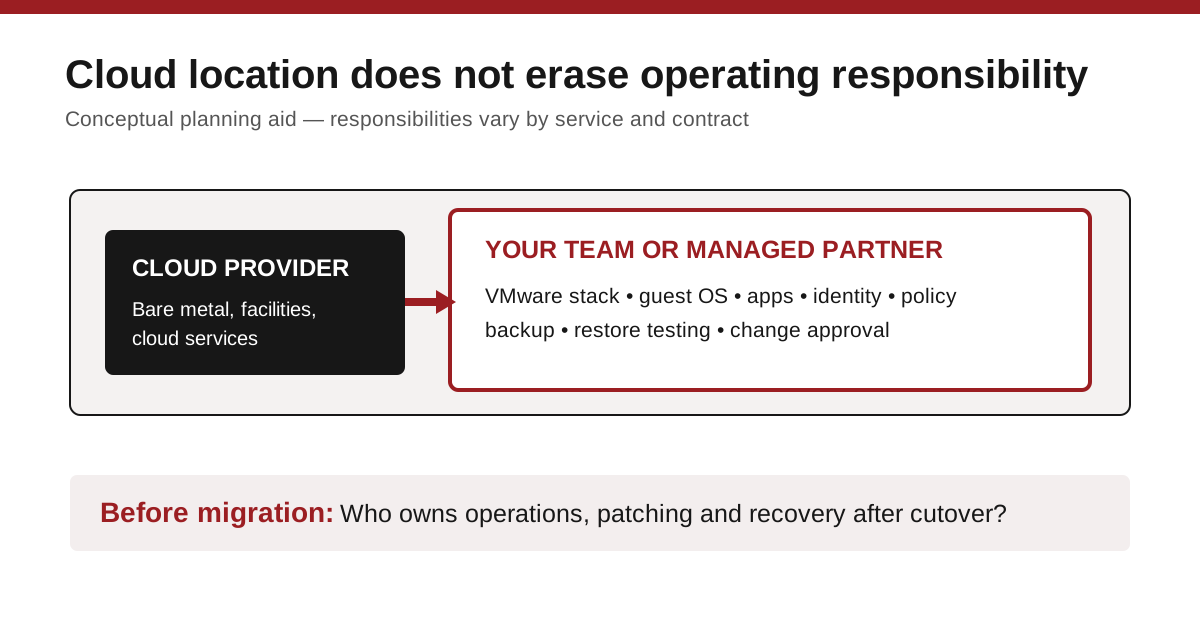
Start by separating the stack into layers. The cloud provider supplies the underlying physical infrastructure and its cloud services. Your organization may still be responsible for VCF administration, guest operating systems, application maintenance, identities, backup policies, network rules and the choices made during an incident.
The exact boundary should be documented in writing. Ask the provider or partner to identify who handles a failed host, a VCF update, an expired certificate, a misconfigured network policy, a compromised administrator account and a failed restore. An answer such as “the cloud handles it” is not sufficient unless it names the service and the support obligation.
The conceptual diagram below is an original DC Supplies planning aid. It does not represent Google’s architecture or a contractually accurate responsibility matrix.
Build a migration inventory before selecting a landing zone
A migration inventory should be more than a list of virtual machines. For each important workload, record its owner, dependencies, storage needs, network connections, backup method, recovery target, licensing status and maintenance window. Include the pieces that live outside a virtual machine: DNS, identity services, firewalls, monitoring, certificates and third-party appliances.
Then categorize applications by migration risk. A stable internal system with few dependencies may be a good pilot. A revenue-critical application with undocumented integrations may need a detailed design and a practiced rollback path. This is not an argument against moving it; it is an argument for avoiding a migration schedule built only around server counts.
Ask for a test migration using a non-production or low-risk workload. Define success in business terms: users can sign in, scheduled jobs finish, backup completes and the team can restore a representative data set. Record the measured time, the exceptions and the work required to reverse the change. A vendor demonstration that starts a VM is useful, but it does not answer all of those questions.
Compare operations, not just infrastructure bills
A self-managed cloud environment may preserve control while adding costs for cloud bare metal, licensing, support, data movement, backup storage and staff or partner time. A managed option may bundle more lifecycle work but impose choices about maintenance timing or supported configurations. Compare the same recovery, security and support outcomes over the same period.
These questions make a strong request-for-quote checklist:
- Which VCF and cloud components will our team patch, and which are managed by the provider?
- What exactly is portable under our current license, and what new commitments are required?
- How will backups, restores and disaster-recovery tests work after migration?
- Which network connections, egress patterns and security controls will add recurring cost or complexity?
- Who is on call during the first production cutover and during the first serious incident?
The practical takeaway
Google’s new self-managed option creates another path for organizations that want cloud placement without giving up the VMware operating model. The attractive part—more administrative control—is also the part that requires more clarity about ownership.
Before choosing a migration path, ask one plain question: after the move, can we name the person or provider accountable for every layer our applications depend on? If the answer is unclear, resolve that before deciding where the virtual machines should live.
Sources and editorial note
- Google Cloud blog — published October 27, 2026; accessed November 1, 2026. Primary source for announced architecture, availability and vendor statements.
- Google Cloud release notes — October 27, 2026; accessed November 1, 2026. Product documentation confirming GA.
- SDxCentral — published October 29, 2026; accessed November 1, 2026. Independent coverage used to corroborate the managed-versus-self-managed distinction.
Sources are four to five days old, so this article uses the permitted seven-day freshness window. Product claims are attributed to Google. No DC Supplies testing, customer results, migration savings, license eligibility or inventory is claimed.