Network security
Who Can Still Log In to Your Switches? A Better Question for Your Next Hardware Refresh
Cisco’s new privileged-access announcement highlights a practical purchasing issue: network equipment needs a clear plan for administrator access throughout its life.
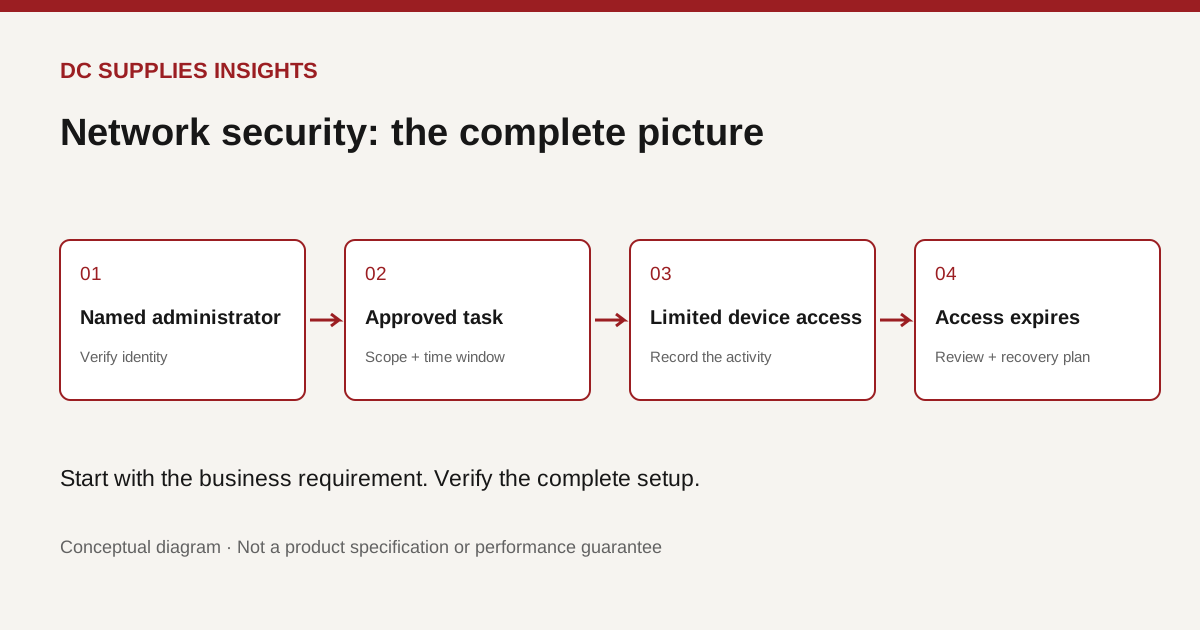
When the maintenance job ends, does the access end too?
A new switch or firewall usually arrives with a clear owner for the purchase. The less obvious question is who owns administrator access after installation, after an outside contractor finishes work, or after the person who configured it changes roles.
On October 26, Cisco introduced Privileged Infrastructure Access. Cisco describes an approach that ties infrastructure access to identity, limits privileges to the task and records activity. Its Partner Summit update places that work alongside growing use of AI tools in network operations.
These are vendor announcements, not independent proof of security outcomes. But they raise a useful question for any business buying network equipment: can your team explain who is allowed to administer each device, and how that permission is removed?
Put access ownership into the purchase discussion
Our suggested starting point is a simple ownership sheet. List the device, business location, person responsible, support provider and approved administration route. Add a review date. The purpose is to make responsibility visible before an emergency forces someone to reconstruct it.
Consider an illustrative retailer opening a second location. An installer needs to configure the network, a support company needs to troubleshoot it, and the store manager needs help when a service fails. Those needs should appear separately in the handover plan. “Everyone uses the same admin login” is not a useful description of accountability.
Ask the supplier to demonstrate how the proposed arrangement supports those roles. A practical demonstration is more informative than a checkbox labeled “enterprise security.”
Understand what the new announcement promises
Cisco says the new offering uses temporary, identity-bound sessions and can draw on Cisco ISE and TACACS+ context for access to its routers and switches. It also describes session recording and an approach that can extend to other infrastructure. Treat supported models, versions, deployment requirements and commercial availability as questions to verify for a specific proposal.
The broader buying principle is our interpretation: management capabilities belong beside ports, throughput and support coverage on the evaluation sheet. Buying a switch does not automatically provide the surrounding identity service, licensing or operating procedures described in a vendor announcement.
Ask for a handover you can actually use
Request a demonstration using a routine support scenario. For example: an approved technician investigates a connectivity issue at one site, records the work, and finishes the task. Ask the installer to show what permission was granted and how it is removed afterward.
Then try a personnel-change scenario on paper. If the contractor relationship ends tomorrow, who takes action, which systems must be updated, and how will completion be checked? Put that sequence into the handover document instead of relying on someone’s memory.
Include ordinary details that tend to get overlooked: where support notices are received, who approves maintenance windows, and who keeps the equipment inventory current. These are proposed operating practices, not features we assume every product includes.
Keep emergency access in the design
A system that only works under ideal conditions is difficult to operate. Ask what happens if the normal identity service or management connection is unavailable. Have your IT owner agree on a controlled recovery procedure and decide how emergency use will be reviewed afterward.
This is also a useful moment to examine connected power equipment. In its March 2022 UPS security guidance, CISA and the Department of Energy advised removing UPS management interfaces from the internet and addressing default credentials. That is older defensive guidance, included as background—not a claim about a new vulnerability or a particular product in our store.
The practical discussion should cover the whole management estate, including equipment that does not look like a conventional computer.
Turn the discussion into quote requirements
Ask each bidder to identify what is included, what requires another service, and what remains the customer’s responsibility. Request a support term, a handover checklist and a planned access review. Compare the proposals on those answers as well as the hardware price.
DC Supplies has relevant networking, network security and power supply/UPS categories. Those links are starting points for hardware selection; they are not claims that every listed item supports Cisco’s new offering or that an access-management service is included.
Share your existing equipment models and management requirements when requesting a quote. Confirm compatibility and the implementation scope with your IT provider before ordering.
One question makes a useful closing test: if we replaced our support provider tomorrow, could we confidently remove its access without losing control of our own network?
References
- Cisco, privileged infrastructure access and Partner Summit updates, October 26, 2026; linked above.
- CISA/DOE, UPS management security guidance, March 29, 2022; historical background.
- DC Supplies category listings; accessed October 29, 2026.
Original DC Supplies diagram: a proposed access lifecycle, not a product architecture or security guarantee. All sources checked October 29, 2026.